A thoughtful gift can make a creator’s everyday setup more comfortable or help smooth out a small part of making and sharing content.
These 13 ideas range from recording gear to practical desk and file-transfer accessories. Check compatibility and current product details before buying.
13 Gift Ideas for Content Creators
MAONO Wave T5 Mini Wireless Lavalier Microphone

- The microphone offers true 48kHz/24-bit recording.
- Four voice presets offer quick tone choices for recording.
- The compact charging case provides 40 hours of total use.
Best Gift For: A mobile creator who records video, interviews, or voiceovers.

FIFINE T669 USB Condenser Microphone Kit

- USB plug-and-play connection works with PC and laptop.
- The included boom arm adjusts to help position the mic.
- A double pop filter helps reduce popping sounds.
Best Gift For: A creator setting up a home desk for podcasts, voiceovers, or video recording.
SteelSeries Arctis Nova Pro Wireless Headset

- The headset can connect to two systems at once.
- Two hot-swappable batteries support continued play.
- Bluetooth lets a mobile device mix calls or music with game audio.
Best Gift For: A creator who games, streams, or listens while switching between devices.
HUANUO FlowLift Dual Monitor Stand

- Each monitor must be 13 to 32 inches, weigh 4.4 to 19.8 lbs, and have VESA mounting holes with a 75x75mm or 100x100mm pitch.
- The arms offer tilt, swivel, and rotation adjustments.
- Built-in cable management guides wires along the arms.
Best Gift For: A creator with two compatible monitors who wants a more adjustable desk setup.
Nulaxy 18-Inch Telescopic Rotating Laptop Stand
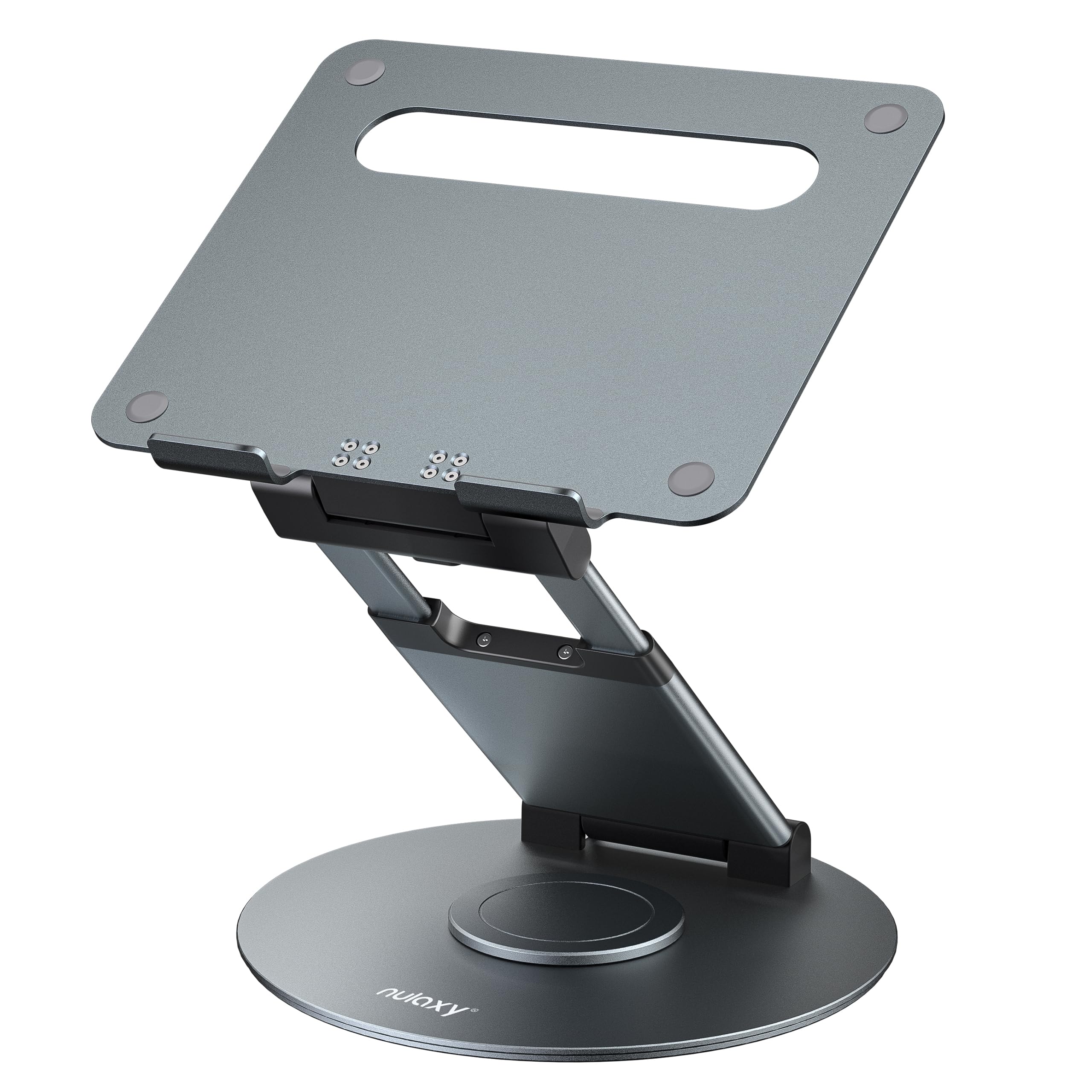
- The stand rotates to help share a screen with someone nearby.
- Height adjusts up to 18 inches for sitting or standing work.
- It fits laptops and tablets up to 17 inches.
Best Gift For: A creator who presents from a laptop or adjusts between sitting and standing.
SABRENT USB-C 6-Port Hub and M.2 SSD Dock

- The hub connects through an integrated USB-C cable.
- It provides HDMI output for an external display at up to 4K@60Hz.
- The internal M.2 slot supports SATA or NVMe SSDs.
Best Gift For: A laptop-using creator who needs extra ports, display output, and expandable storage.
SABRENT USB-C and USB-A SD Card Reader

- USB-C and USB-A connections work across compatible devices.
- Dual slots read SD and Micro SD card formats.
- The plug-and-play reader requires no drivers or software.
Best Gift For: A creator who moves photos or video files from memory cards to a computer or supported Android device.
MagSafe-Compatible 5000mAh Slim Wireless Power Bank

- Magnetic alignment is designed for MagSafe-compatible phones and cases.
- It combines wireless charging with USB-C output.
- Its 5000mAh battery can provide up to one full charge for an iPhone 16, making it suitable for commuting, travel, and everyday emergencies.
Best Gift For: A creator who uses a compatible iPhone for filming, calls, or sharing while away from a desk.
SteelSeries Apex Pro Wired Gaming Keyboard

- Per-key actuation can be adjusted across 40 levels.
- The display shows information from games and apps.
- USB passthrough connects an additional powered device.
Best Gift For: A creator who games or prefers customizable keyboard controls at a desk.
Audioengine A2+ Wireless Desktop Speakers

- Bluetooth and wired connections support a range of audio sources.
- The speakers include an integrated digital-to-analog converter that connects to a computer through USB-C.
- Real wood cabinets are hand-finished.
Best Gift For: A creator who listens to music, gaming, video calls, podcasts, or movies at a desk.
SteelSeries Aerox 3 Wireless Gaming Mouse

- The mouse uses a holey shell designed to reduce weight.
- Its RGB lighting offers configurable colors.
- Wireless connection options include 2.4GHz and Bluetooth 5.0.
Best Gift For: A creator who games or wants a wireless mouse for a gaming desk.
HP Sprocket Select 2.3x3.4 Instant Photo Printer

- It prints photos from a smartphone or social media.
- The printer uses ZINK paper without toner or ribbon replacements.
- The app includes editing tools and sticker options.
Best Gift For: A creator who likes turning phone photos into small prints or custom stickers.
Sleek Socket Flat Outlet Concealer and 3-Outlet Power Strip
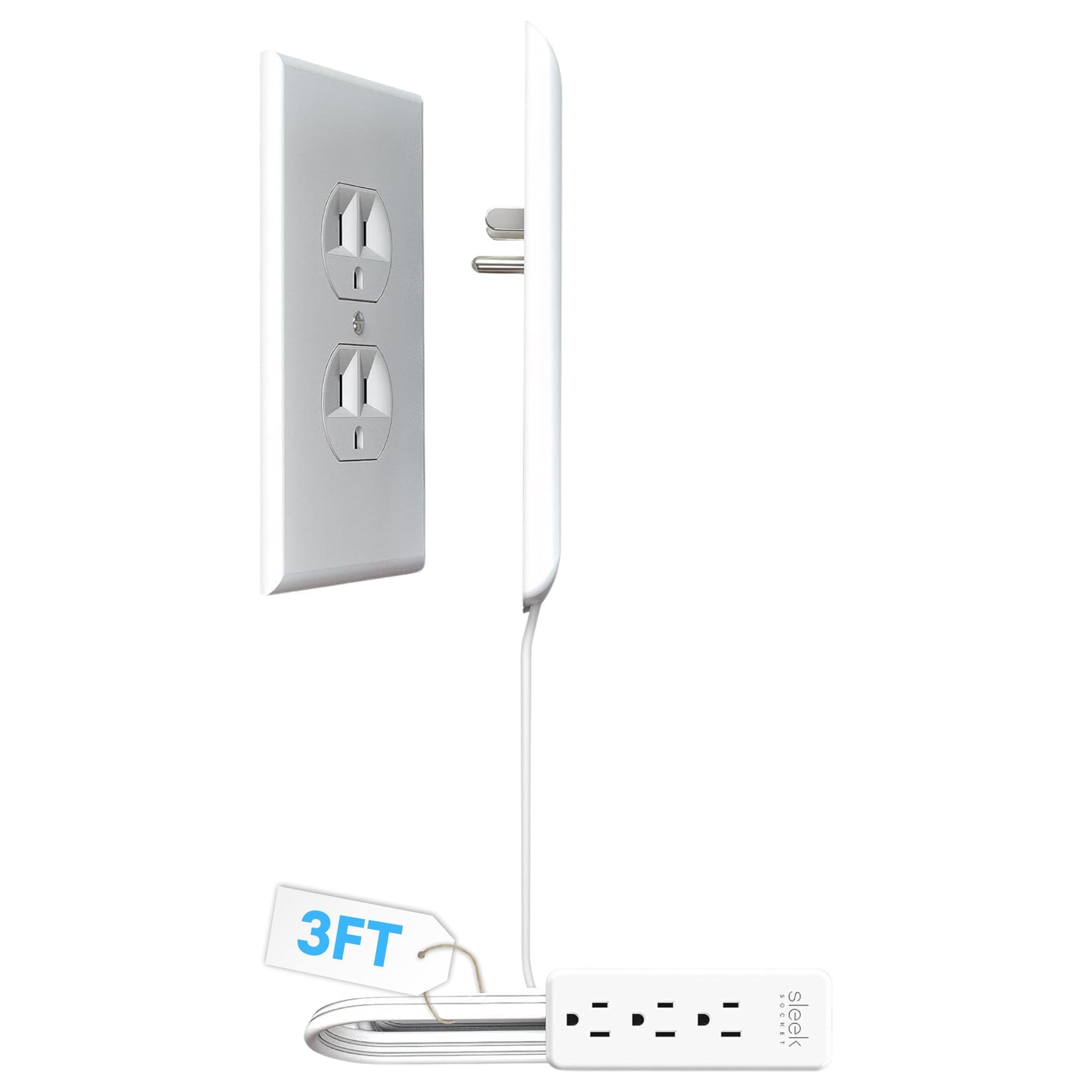
- The kit includes a 3-foot cord and a 3-outlet power strip.
- Adhesive clips and strips help secure the cord along a wall.
- It attaches to a standard duplex outlet without tools.
Best Gift For: A creator who wants to tidy visible plugs and cords around a home workspace.
Choosing gifts for content creators by workflow
When choosing gifts for content creators, start with the part of making that occupies the recipient’s time. Someone who records away from home may appreciate an easier audio or power setup; someone who edits at a desk may care more about screen position, ports, or a tidier surface.
Think about what they already use before choosing.
A useful question is where a small friction point shows up: moving footage from a camera, setting up a microphone, switching between devices, or finding room for another screen. A gift that fits that routine can feel more personal than a general gadget, even when it is a practical accessory.
If you are unsure what they own, look at the devices they mention or use in shared work and ask a mutual friend. For anything that connects to a phone, laptop, monitor, or memory card, check the current compatibility details before ordering.
A little homework can prevent an otherwise thoughtful gift from becoming an awkward mismatch.
Set a comfortable budget and check the fit
The range here spans small desk helpers and accessories through more substantial audio and workspace equipment. Decide on a comfortable spending level first, then compare what the gift actually helps the recipient do.
A compact card reader or cord organizer may solve a frequent annoyance; a larger setup change makes more sense when you know it is wanted.
For gifts for content creators, budget should include any pieces the recipient may need for the item to work with their existing setup. Check actual prices and current product details, then account for compatible cables, devices, or other required accessories where applicable.
Avoid assuming the recipient already has the matching equipment.
When a purchase depends on fit, confirm dimensions, connection types, mounting needs, and any device requirements. A monitor arm or laptop accessory is only useful if the desk and equipment suit it.
The recipient may prefer choosing a major component themselves, so a smaller compatible accessory or a contribution toward their own pick can be a more comfortable option.
Add a personal touch to gifts for content creators
Personalization can come from how you present a gift, even when it is equipment. Pair it with a short note that names a project they are excited about, such as a new interview series, a home studio refresh, or a plan to share more travel footage.
That connection makes a practical choice feel tied to their creative goals.
Consider giving a small accessory alongside something they will use up or enjoy, such as a notebook for ideas or a snack for a long editing session. Keep any extra simple and aligned with what you know about them.
For a larger item, a card explaining why you chose it can make the gift feel considered without adding clutter.
For gifts for content creators, presentation can also include a low-pressure offer to help set up or test the new gear together, if they would enjoy that. Leave room for them to configure it their own way.
Avoid opening packaging or signing them up for accounts; preserve their choice about how and when to incorporate it.
Plan timing and keep last-minute choices simple
For a near-term occasion, check current delivery estimates before you commit, since arrival timing can change. If shipping is uncertain, choose a gift you can present thoughtfully in person or pair the physical item with a handwritten note that explains why it made you think of them.
Last-minute shopping is easier when the choice has few compatibility questions. A workspace organizer or a small accessory may be simpler than a device that needs to match a particular computer, phone, camera, or mounting setup.
Check the exact product variant, current details, and delivery estimate at checkout.
If you cannot confidently verify a technical match in time, give a card with a clear plan to shop together after the occasion. That keeps the recipient involved in a decision that affects their setup, while still making the gesture feel intentional.
A brief note about the kind of project or routine you had in mind adds warmth without promising that a particular item will suit every creator.
Make the final choice feel considered
Before buying, picture the recipient’s real routine rather than an idealized studio. Do they record at home, work from different locations, edit with a laptop, or share finished images with friends?
The most useful choice is one that fits the space and habits they already have, with room for their approach to change.
A gift does not need to transform someone’s whole workflow to be meaningful. Small conveniences can earn their place through regular use, while premium equipment should match a clearly expressed need.
If they are particular about their tools, ask about preferences or choose a flexible option that leaves the final technical decision to them.
Include a gift receipt when available and keep the packaging and accessories together. This gives the recipient a straightforward way to handle a mismatch, while the note and presentation preserve the thought behind the gift.
A little attention to fit, timing, and their current creative plans makes the choice feel personal and useful.